Choose the order accounts are used
When cash runs short, the plan takes money from your accounts in an order. The order can change the tax you pay.
Updated November 21, 2026
- Step 1:
Open a plan. Under Edit this plan, open Withdrawal order. The top account is used first.
Sample plan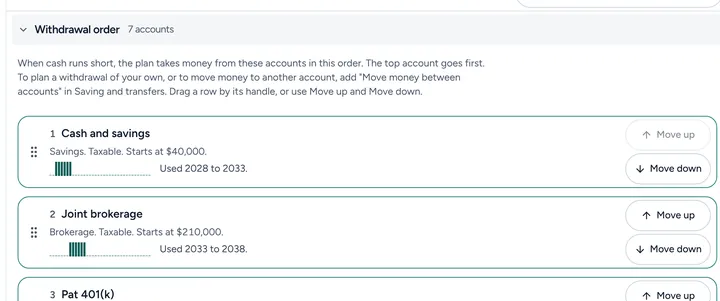
- Step 2:
With Plus, press Move up or Move down on an account to change its place, or drag a row by its handle. On Free, the plan uses the order shown.
- Step 3:
To plan a withdrawal of your own, add Move money between accounts in Saving and transfers.
Good to know
- Each row says the years the plan uses that account.
- Free shows the order your plan uses. With Plus, you can move any account up or down the order.
- Read more: Withdrawal order
Still stuck? Email support@filoah.com.