Compare Social Security start ages
Starting Social Security earlier or later changes how much you get each month. This page shows what each age does to your whole plan.
Updated November 21, 2026
- Step 1:
Open a plan. On the top card, under the tools for this plan, press Compare Social Security start ages.
- Step 2:
The table shows each start age from 62 to 70 with its Monthly benefit. Press Compare under an age to see it on the chart beside your plan.
Sample plan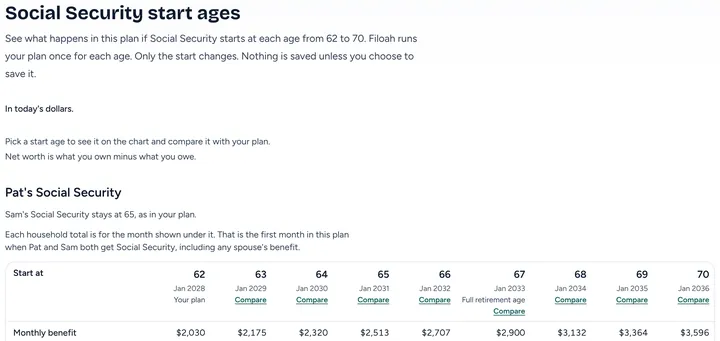
- Step 3:
To keep an age, press Use in this plan. To try it without changing this plan, press Save as a new plan.
Sample plan
Good to know
- Only the start age changes. Nothing is saved unless you choose to save it.
- Free shows the monthly benefit at each age. Plus shows when money lasts, net worth at the end and taxes at each age.
- Read more: Social Security start ages
Still stuck? Email support@filoah.com.