How taxes are estimated
Taxes come out of your money every year, so the plan estimates them for each year from your income and your state.
Updated November 21, 2026
- Step 1:
Open a plan and pick the Taxes tab. The chart shows the tax for each year, split by kind.
Sample plan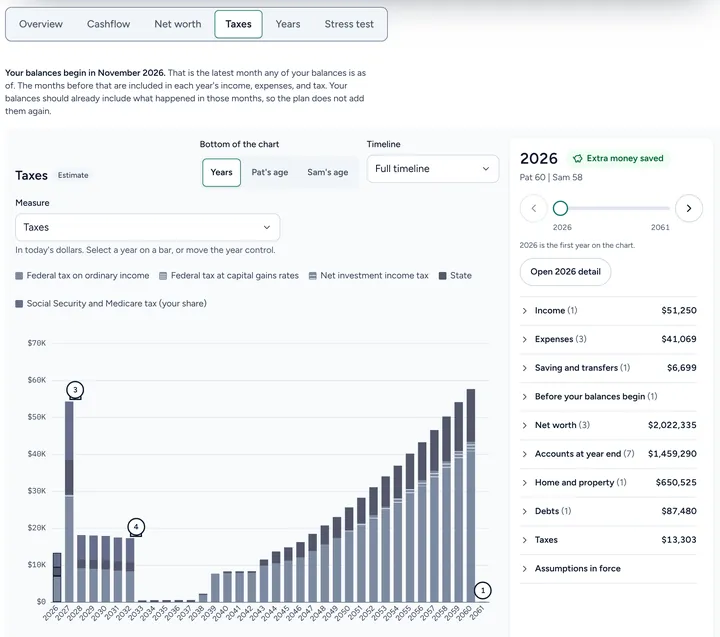
- Step 2:
Select a year to open its page. With Plus, the Taxes block shows the income for tax, the deductions, then Federal income tax, State income tax and Payroll tax. On Free, it shows the estimated total tax.
Sample plan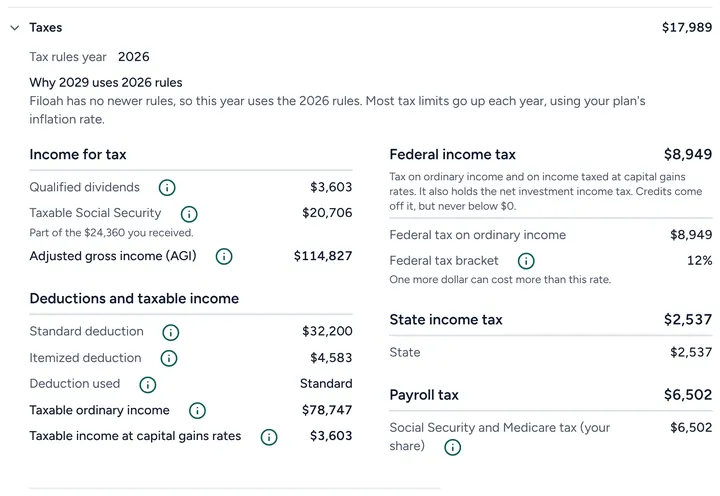

Good to know
- Filoah uses the latest tax rules it has. A later year uses them too, and most tax limits go up each year with your plan's inflation rate.
- It is an estimate to project your plan. It is not tax advice and not a tax return.
- Free shows your estimated total tax for each year. Plus shows the full tax breakdown on screen.
- Read more: Retirement taxes
Still stuck? Email support@filoah.com.