See one year in detail
The year page shows one year of your plan up close: the money in, the money out, and why.
Updated November 21, 2026
- Step 1:
On the Years tab, select a year in the Year column. The year page opens with the ages of each person that year.
Sample plan
- Step 2:
A label such as Taken from accounts says what happened that year. Use Previous year and Next year to move one year at a time.
- Step 3:
The cashflow chart shows each kind of income on the left, and taxes, spending and debt payments on the right. Press View as table to read the same numbers as a table.
Sample plan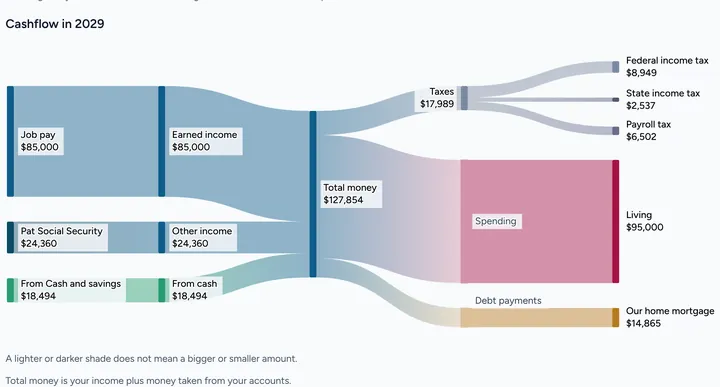

Good to know
- Taken from accounts means spending was more than income that year, so money came out of your accounts.
- Extra money saved means money was left over and saved.
- Free shows the estimated total tax for each year. Plus shows the full tax breakdown, line by line.
Still stuck? Email support@filoah.com.