Ask Filoah Chat to change your plan
Filoah Chat can answer questions about your plan and make changes to it, but only the ones you apply.
Updated November 21, 2026
- Step 1:
Open a plan and press Ask Filoah. The Filoah Chat panel opens.
- Step 2:
Type your question or the change you want in the Message box and press Send. Press New chat to start over.
Sample plan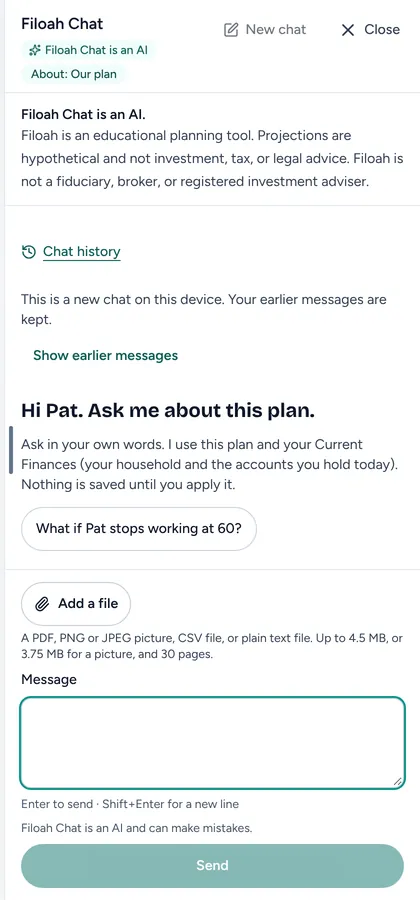
- Step 3:
When Filoah Chat suggests a change, it shows it first. Press Apply to this plan to make the change, or Don't apply to leave the plan as it is.
Sample plan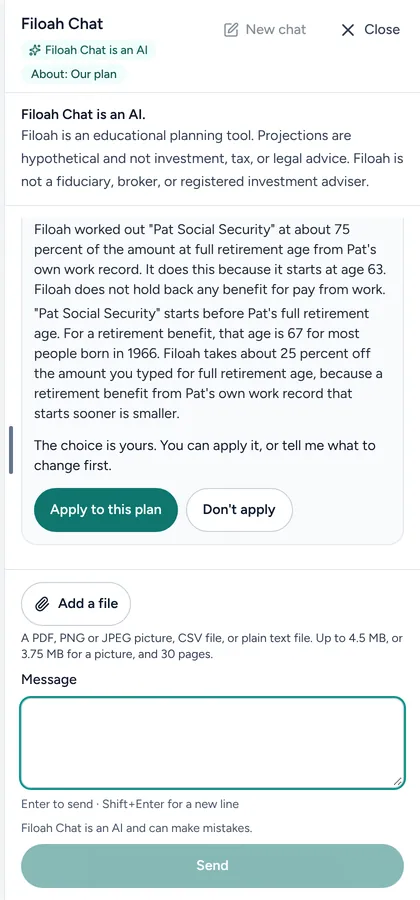
Good to know
- Filoah Chat is an AI and can make mistakes. Check a change before you apply it.
- Nothing is saved to your plan until you apply it.
- It can change what you entered, such as income and spending. It never changes the results the plan works out.
- Filoah Chat is for learning. It is not investment, tax or legal advice.
- A free account can send 30 Filoah Chat messages each calendar month. See Filoah Chat message limits.
- Read more: Filoah Chat
Still stuck? Email support@filoah.com.