Add your home and your debts
Your home and your loans count in your net worth, and loan payments count in your yearly spending.
Updated November 21, 2026
- Step 1:
Open Current Finances and pick Real assets. Press + Add asset.
Sample plan
- Step 2:
Type a Name and pick the Kind, such as a primary residence. Type the Purchase price and the Current value, set As of, and pick the Owner and the Status. Press Save.
Sample plan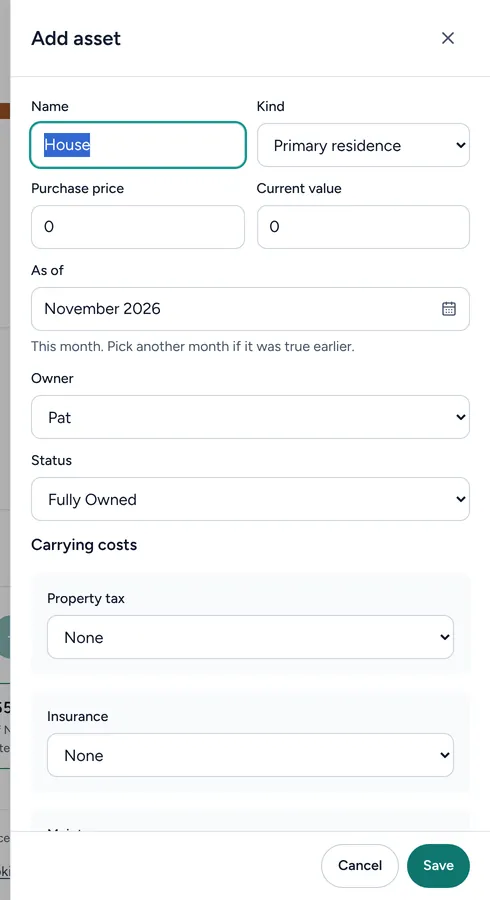
- Step 3:
For a car loan, a card or another loan, pick Other debts and press + Add debt. Type the Current balance, the Annual percentage rate (%) and the Monthly payment, then press Save.
Sample plan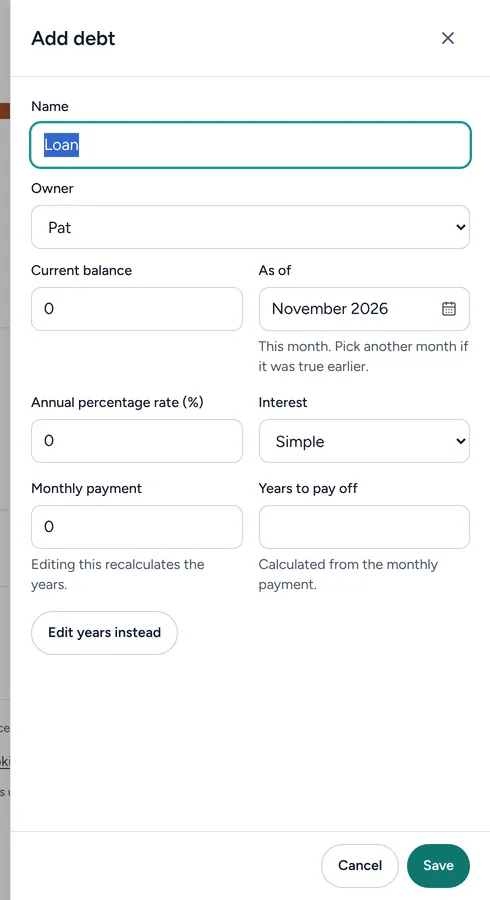
Good to know
- The Real assets total takes off what you owe on each home.
- You do not need to add your mortgage payment to your spending too. The plan counts loan payments for you.
Still stuck? Email support@filoah.com.